SafeAgent Coder: Runtime-Controlled Coding Agent

What is SafeAgent Coder?
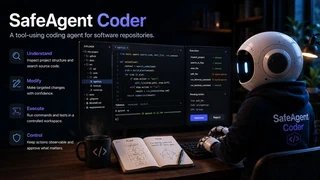
SafeAgent Coder is a coding agent that works directly inside software repositories. It inspects a project’s structure, finds the files and symbols that matter, reads and searches source code, makes targeted changes, prepares a development environment, and runs the commands needed to build or test a project — all within one workflow.
Everything comes together in a local development workspace. The agent starts by understanding an unfamiliar repository, then moves on to making and validating a change without switching tools or copying code between windows. File operations, repository inspection, environment setup, and command execution are exposed to the agent as tools, and the surrounding application provides the workspace and interface where those actions actually take place.
Tool use stays visible while the agent works. Selected operations are intercepted before they take effect, so they can be checked or sent for human approval when needed. Controlled execution is one part of SafeAgent Coder; at its core it is a coding agent built for practical, repository-level development tasks.
How Does It Work with a Repository?
When SafeAgent Coder receives a repository-level task, it begins by building enough context about the project before making any changes. For an unfamiliar codebase, that usually means inspecting the directory structure, identifying entry points and dependency files, locating tests, and searching for the symbols or configuration related to the task.
From there, the agent narrows its attention to the files that actually matter. It reads source code, follows references across the project, and uses what it has gathered to decide what needs to change. It favors small, targeted edits and works incrementally whenever possible.
Once a change is in place, the same workflow can continue into execution. The agent prepares a Python environment, installs project dependencies, runs build or test commands, inspects the output, and uses those results to decide whether another iteration is needed.
For example, a request such as:
Find why the tests are failing and fix the problem.
might lead the agent through a sequence like:
inspect project → locate tests → search relevant code → read source → edit → run tests → verify
Every task takes its own path. A simple question may need only a few inspection tools, while a setup, debugging, or adaptation task can involve several rounds of reading, execution, and modification. The goal is to let the agent treat the repository as a living development environment.
Inside the Agent
SafeAgent Coder builds its coding agent with LangChain and LangGraph. The agent is assembled from a chat model, a repository-oriented system prompt, a set of MCP tools, persistent graph state, and an execution layer that sits around tool calls.
The current implementation pulls its tools from LangChain’s
MultiServerMCPClient. When a new agent session is created, it connects to
the local MCP server and loads the available development tools before passing
them to create_agent. The model, tools, system prompt, checkpoint memory,
and middleware are then combined into a single LangGraph-backed agent named
vibe_shell.
client = MultiServerMCPClient(...)
tools = await client.get_tools()

agent = create_agent(
    model=model,
    tools=tools,
    system_prompt=SYSTEM_PROMPT,
    checkpointer=memory,
    middleware=middlewares,
    interrupt_after=["tools"],
    name="vibe_shell",
)
The system prompt gives the agent a fairly specific working style. It is encouraged to understand a repository before acting, narrow its search before reading large parts of the codebase, prefer targeted edits over broad rewrites, and run commands from an explicit project directory. This keeps the agent loop focused on deliberate progress through a repository, with each tool call serving that progress.
Each user session also carries its own agent state. A MemorySaver
checkpointer keeps the LangGraph thread state across multiple steps, while the
application caches the corresponding agent instance by session ID. That
continuity matters for repository tasks that need several rounds of reasoning
and tool use: the agent inspects a project, receives tool results, continues
reasoning, makes a change, and runs another command, all without treating every
action as an independent request.
Execution is streamed live. The runner listens for model-output, tool-start, and tool-end events as the graph runs. Model tokens arrive in the chat interface as they are generated, while each tool invocation and its result land in a separate execution trace. In practice, you can watch both sides of the agent at once — what it is saying and what it is actually doing inside the workspace.
The agent also supports interruptions after tool execution. SafeAgent Coder uses this hook for controlled execution and human-in-the-loop interactions, layered on top of the same coding-agent loop. We will come back to that shortly.
The Tool Workspace
The agent works inside a dedicated development workspace, backed by a Docker container and exposed through an MCP server. Keeping the agent’s environment separate means it can touch files and run commands in a safe, isolated place.
The playground container runs a FastMCP server and mounts a working directory
at /home/ubuntu/workspace. Docker Compose exposes the MCP service on the host,
and the LangChain agent connects to it through MultiServerMCPClient. The
reasoning side of the agent stays cleanly separated from the environment where
file operations, project setup, and command execution happen.
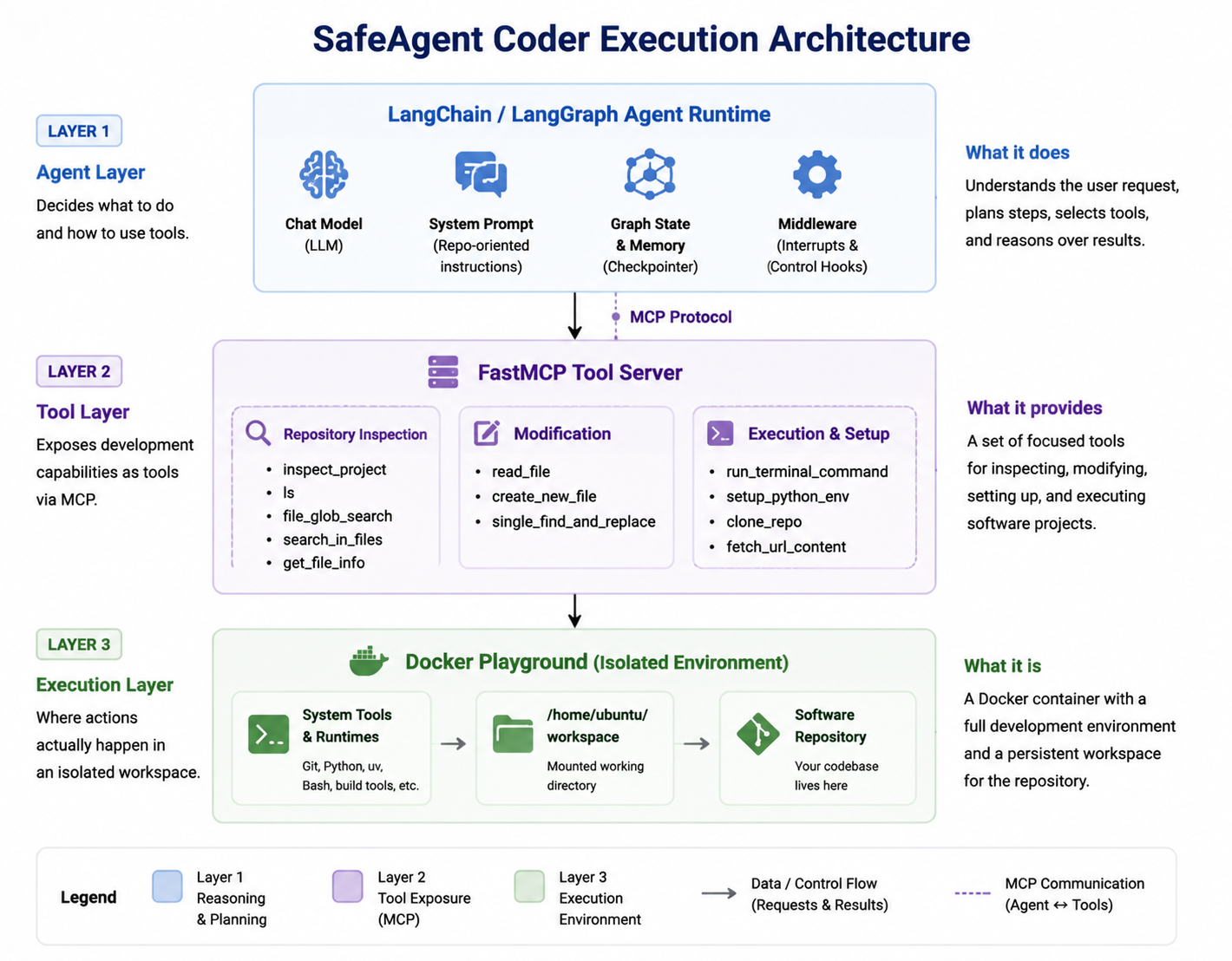
The execution stack: a LangChain/LangGraph agent talks MCP to a FastMCP server inside a Docker playground, whose mounted workspace holds the software repository.
The container behaves like a small development machine. It is based on Ubuntu
and ships with common command-line utilities, plus Git, Python, virtual
environments, and uv, so the agent can handle repositories that need more
than simple file editing.
The MCP server turns those environment capabilities into a set of repository-oriented tools that cover a normal development workflow:
- Project understanding —
inspect_project,ls,file_glob_search,search_in_files, andget_file_info - Source inspection and editing —
read_file,create_new_file, andsingle_find_and_replace - Execution —
run_terminal_command - Repository and network access —
clone_repoandfetch_url_content - Environment setup —
setup_python_env
These tools are deliberately narrow, giving the model focused operations for
common development steps. For example, inspect_project looks for common
project markers such as pyproject.toml, package.json, Cargo.toml,
go.mod, pom.xml, Makefile, and CMakeLists.txt, and returns likely
project types, dependency files, entry points, and tests. That gives the agent
a quick first view of an unfamiliar repository before it starts reading files
one by one.
For source navigation, the workspace separates searching paths from searching
contents. file_glob_search narrows the repository by file pattern, while
search_in_files looks for symbols or text inside matching files. Both cap
their results, so a large repository does not flood the agent context with
irrelevant information.
File access follows the same workspace boundary. Before any path is used, the
MCP server resolves it against WORKSPACE_ROOT and rejects paths that escape
the configured workspace. The same resolver guards reading, editing, directory
inspection, command working directories, and other file-oriented operations.
When execution is needed, run_terminal_command starts a Bash subprocess
inside a selected directory in the workspace and returns its exit code,
standard output, and standard error to the agent. That is how a task flows
naturally from reading code into running pytest, a build command, or another
project-specific tool, then reasoning over the result.
The workspace can also set a project up before running it. setup_python_env
creates a virtual environment and installs dependencies from a requirements
file or project configuration, using uv when available and supporting a
standard Python environment as well. Repository cloning is exposed separately
through clone_repo, so a project can be brought into the workspace and
handled by the same inspection, editing, and execution workflow.
Controlled Execution
Giving an agent access to files and a terminal is useful, but it also means some actions deserve more attention than others. SafeAgent Coder adds a control layer around tool execution so proposed actions can be inspected before they reach the workspace.
In the current playground configuration, read-oriented operations such as project inspection, file search, directory listing, and file reading proceed directly. Actions with more visible side effects — creating or editing files, cloning a repository, preparing an environment, or running a terminal command — are paused for confirmation.
When that happens, the proposed tool call appears in the WebUI together with its arguments. You can approve the action and let the agent continue, or reject it before it executes. Meanwhile, the Function Calls panel keeps a trace of tool invocations and their results, so the agent’s execution stays visible alongside the conversation.
This control mechanism is deliberately one part of the project. The coding workflow keeps working as before: the agent reasons about a repository, selects tools, observes their results, and continues. The execution layer simply adds a place to step in when a particular action deserves a human check before it runs.
A separate technical note will look more closely at how this kind of controlled agent is built with LangChain middleware, LangGraph state, MCP tools, and human-in-the-loop execution.
SafeAgent and Resources
SafeAgent Coder was developed alongside SafeAgent, our broader work on runtime protection for agentic systems. SafeAgent Coder focuses on one concrete application — a coding agent that works with repositories and development tools — while SafeAgent studies the more general problem of governing agent actions during execution.
The two projects serve different purposes and complement each other. SafeAgent Coder is the place to explore the coding-agent implementation and its development workspace. The SafeAgent paper describes the broader runtime protection architecture, and SafeAgent Core provides the corresponding decision-side components.
The interactive playground currently uses a lightweight configurable decision backend, which makes it easy to experiment with different tool policies without tying the coding agent to a particular safety backend. The agent-side control interface stays separate, so other decision backends can be plugged into the same execution workflow.
The resources below connect this coding agent to the wider SafeAgent project: the SafeAgent Coder implementation, the paper behind the runtime protection architecture, and the SafeAgent Core decision-side components.
